

AGV wireless communication is the network connection that carries dispatch commands, status reports, telemetry, video and maintenance data between an automated guided vehicle and plant systems. A dependable design requires more than WiFi coverage: it must manage movement between access points, radio interference, vehicle-mounted antennas and loss of an upstream path.
MAXON's mobile robot architecture combines each industrial wireless access point with centralized AP management, vehicle-mounted industrial wireless clients, industrial Ethernet switching and optional 4G/5G routing. It can support AGVs, autonomous mobile robots (AMRs), wheeled inspection robots and robot dogs. The right AGV wireless communication design depends on the traffic carried by the robot, the required recovery time and conditions inside the facility.
The market is already substantial. The International Federation of Robotics reported that 102,900 professional service robots for transportation and logistics were sold in 2024, an increase of 14 percent from the previous year. More than half of all professional service robots sold that year belonged to this application group. That installed base creates a practical need for industrial wireless networks that can maintain communication while robots move through factories and warehouses.

Application illustration: a MAXON industrial AP provides local Wi-Fi coverage, while a vehicle-mounted wireless client and industrial 4G/5G router provide two distinct communication options.
Why AGV wireless communication fails in factories and warehouses
A stationary sensor can tolerate a short reconnection or a delayed packet. A moving robot often cannot. Its connection may carry a heartbeat to the robot control system, task updates from a warehouse management system, live video from an inspection camera and diagnostic data for maintenance. These flows have different bandwidth and delay requirements, but they share the same radio environment.
Factories and warehouses are difficult RF spaces. Steel racks, machines, vehicles and stored goods create reflection and shadowing. A route that works during commissioning may change after inventory, equipment or partitions move. Motors, variable-frequency drives and other radio systems add noise. The client antenna also moves close to metal structures and people, which changes its effective radiation pattern.
Roaming adds another problem. An AGV can remain connected to a weak access point even after entering the coverage area of a better one. Authentication and key exchange may extend the interruption if the client and infrastructure are not configured for mobility. The resulting symptom is familiar: the coverage indicator looks acceptable, yet the robot pauses, loses video or misses a dispatch update near a cell boundary.
AGV WiFi roaming is only one part of the problem. Industrial wireless design starts with application traffic, route conditions and failure behavior, not with an access point count. The same principle applies to AMR wireless connectivity and inspection robot wireless communication.
Industrial wireless access point architecture for AGVs and AMRs
The following architecture separates business applications, control, wired infrastructure, radio access and the equipment installed on each robot. This makes it easier to find a fault and to expand the fleet later.
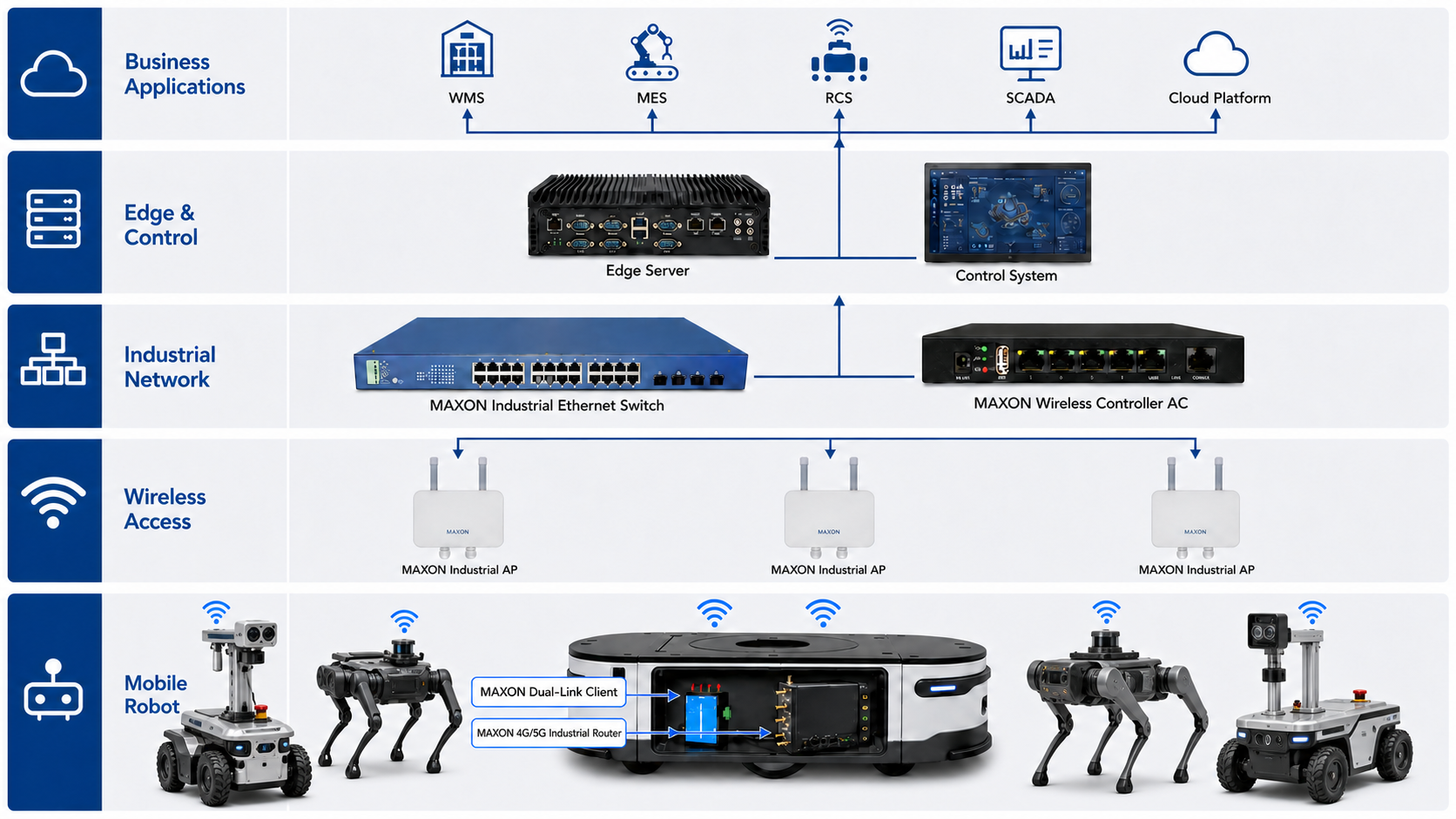
Figure 1. A five-layer reference architecture with three MAXON industrial APs, centralized wireless control, an industrial Ethernet backbone and mobile robot endpoints.
Business application layer
The business layer can include a warehouse management system (WMS), manufacturing execution system (MES), robot control system (RCS), SCADA platform and cloud monitoring service. These systems assign tasks, receive production data and show fleet status. They should not need to understand the details of each radio handover.
Edge and control layer
Edge servers and control systems process local data and keep important decisions close to the production floor. Local processing can reduce dependence on a remote cloud connection, but it does not remove the need for a stable wireless path between the robot and the control network.
Industrial network layer
The wired backbone connects the edge systems, MAXON industrial Ethernet switch and MAXON wireless controller AC. Centralized AP management can keep SSID, security, radio and roaming policies consistent across the coverage area. VLANs and quality-of-service policies should separate robot control, video, maintenance and general IT traffic when the project requires that separation.
Wireless access layer
Multiple MAXON industrial WiFi access points create overlapping radio cells along robot routes. The objective is controlled overlap, not maximum transmit power. Excessive power can increase co-channel interference and encourage clients to remain associated with a distant AP. Each industrial wireless access point should be placed and configured according to an on-site RF survey, antenna pattern, channel plan and mounting height.
Mobile robot layer
Each AGV, AMR or inspection robot connects through a vehicle-mounted industrial WiFi client. This industrial wireless client bridges the robot's Ethernet equipment to the plant WLAN. An industrial 4G/5G router can add a cellular path for backup connectivity, remote operation or outdoor sections of the route. The router is a separate device with a different upstream network; it should not be described as a second WiFi association.
AGV WiFi roaming and AMR wireless connectivity options
No single topology fits every robot project. The following designs address different failure modes.
Standard AGV WiFi roaming between industrial access points
In the standard design, one vehicle-mounted client communicates through one AP at a time. As the robot moves, the client selects a new AP and changes association. IEEE 802.11k, 802.11v and 802.11r can assist neighbor discovery, network steering and fast BSS transition when both the infrastructure and client support the required functions.
These standards do not guarantee a fixed handover time by themselves. The result also depends on authentication mode, firmware, scan behavior, RF overlap, channel layout and client thresholds. Measure interruption, packet loss and application recovery on the complete system before accepting the design.
This WiFi roaming solution suits fleets whose applications can tolerate the measured transition interval and where a single client link meets the availability target. It is often the starting point for AGV wireless communication projects with moderate recovery requirements.
Pre-connected dual-link WiFi roaming solution
A dual-link client can maintain an active communication link while preparing a second link to a candidate AP, if that behavior is supported by the selected MAXON client, firmware and network configuration. When the robot crosses the coverage boundary, the prepared link can take over without starting every connection step from the beginning.
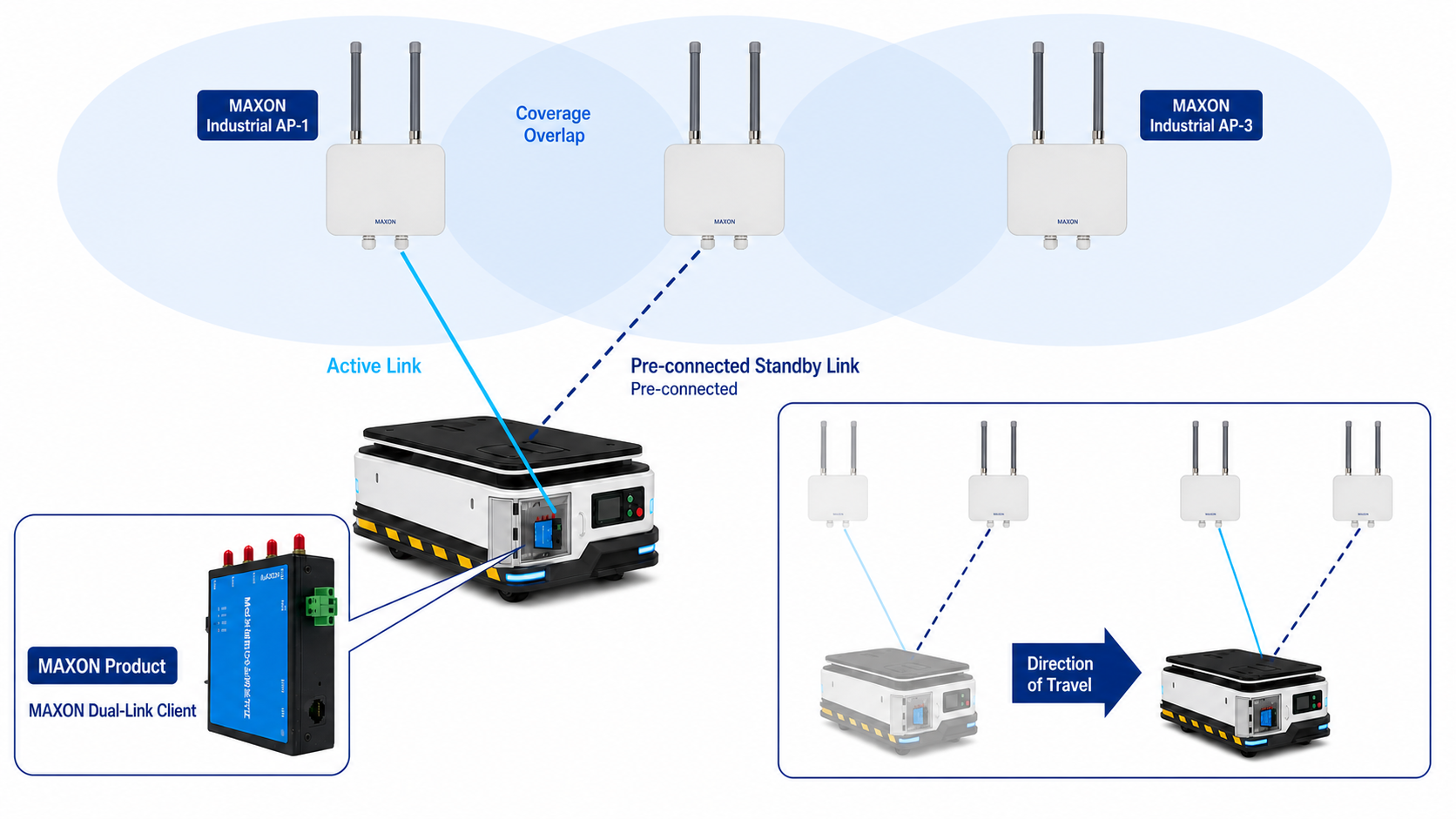
Figure 2. Conceptual dual-link roaming. The active and standby paths must be verified on the exact client, AP, security and application configuration used in the project.
This design addresses the interruption caused by association and authentication during movement. It does not remove RF engineering requirements. Both paths can still be affected by poor antenna placement, common interference, inadequate cell overlap or a wired-network fault upstream of the APs.
Use this option when the robot carries time-sensitive control traffic, high-rate inspection video or other applications that have failed the acceptance criteria with ordinary single-link AGV WiFi roaming. The design should be validated under motion and load, not only while the robot is stationary.
Wi-Fi and 4G/5G dual-uplink connectivity
Wi-Fi and cellular connectivity protect against a different class of failure. In this design, the vehicle-mounted client uses the plant Wi-Fi network and the industrial 4G/5G router uses a cellular network. A link-monitoring and routing policy selects the preferred path and changes to the backup when defined health checks fail.
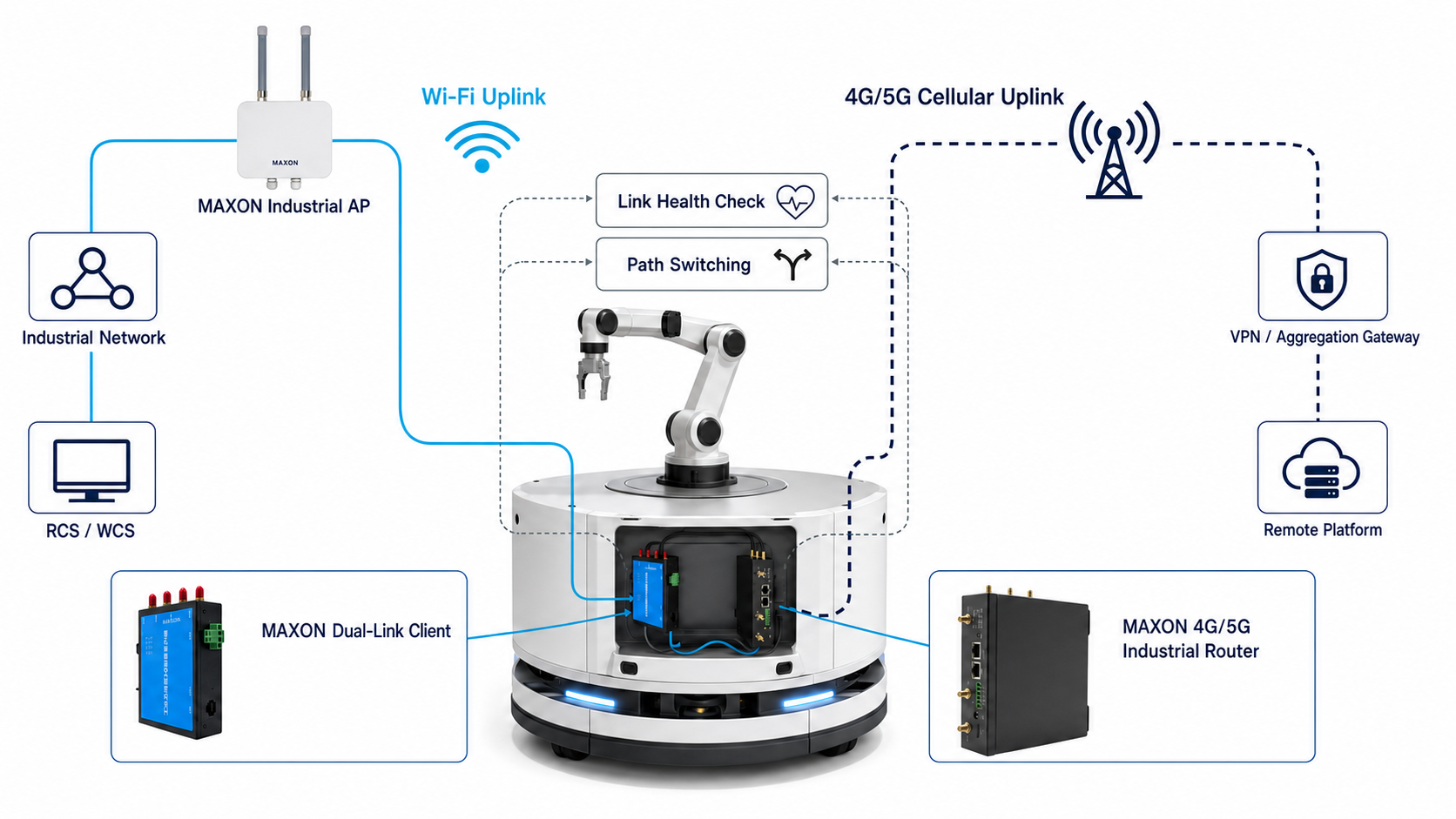
Figure 3. Wi-Fi and cellular paths connect through different upstream networks. Path switching is not the same as packet-level bonding and should be described according to the implemented routing mechanism.
This arrangement can keep management access or selected application traffic available after a Wi-Fi infrastructure outage. It is also useful when a robot travels between indoor Wi-Fi coverage and an outdoor or remote area served by a public or private cellular network.
Failover is not automatic merely because both radios are installed. The system needs a defined routing policy, health-check target, failure threshold, recovery timer and return-to-primary behavior. Stateful sessions, VPN tunnels, IP address changes and application timeouts must be tested. If both links depend on the same power supply, gateway or upstream carrier, the apparent redundancy still contains a common point of failure.
How industrial WiFi access points and wireless clients work together
The equipment should operate as one network rather than as isolated products.
| System component | Role in the robot network | Engineering questions |
|---|---|---|
| MAXON industrial WiFi access point | Provides WiFi coverage along production and inspection routes | Which band, channel width, antenna pattern, mounting position and cell overlap fit the site? |
| MAXON dual-link industrial WiFi client | Connects the robot Ethernet equipment to the wireless infrastructure and can support a pre-connected standby link on applicable configurations | Which firmware and security mode are required? How are active and standby links selected? |
| MAXON industrial 4G/5G router | Provides cellular WAN access for backup, remote sections or independent management traffic | Public or private 5G? Which bands, SIM, VPN, routing and failover policy are required? |
| MAXON industrial Ethernet switch | Aggregates APs, controllers, servers and other wired equipment | Are PoE, VLAN, fiber uplinks, redundancy and port capacity required? |
| MAXON wireless controller AC | Centralizes AP configuration and radio management | How many APs, which roaming policies and what monitoring data are needed? |
The exact model must be selected from confirmed requirements. MAXON should verify wireless standard, frequency, interfaces, input power, environmental rating, antenna connectors and operating temperature against the current product datasheet before quotation.
How to design and commission the network
Define the traffic before selecting hardware
List every flow to and from the robot. Record its normal and peak throughput, packet direction, maximum acceptable interruption and recovery behavior. A dispatch heartbeat, a 4K inspection stream and a maintenance download should not receive the same network priority.
Identify which traffic must continue during a Wi-Fi outage. Some projects need only remote diagnostics on cellular backup. Others need the RCS connection and video tunnel to survive. This decision determines the router, VPN and routing design.
Survey the complete robot route
Measure signal strength, noise, channel use and interference at the robot antenna height. Include turns, lifts, charging points, narrow aisles, metal racks and areas where people or vehicles can obstruct the path. Repeat critical measurements under representative production conditions.
An RF survey should also consider the moving client. A handheld survey device at human height does not reproduce an antenna mounted inside a metal robot chassis.
Design overlap and capacity together
Adjacent cells need enough overlap for the client to find and prepare the next connection, but more overlap is not always better. Reusing the same channel too closely can reduce capacity. Wide channels can increase throughput in a clean environment, yet they also consume more spectrum and may be harder to reuse in a dense factory.
Plan for the fleet at peak operation. Include multicast or broadcast behavior, video bursts, software updates and the possibility that several robots enter the same cell at once.
Install antennas as part of the radio system
A good client can perform poorly behind a battery enclosure or close to a large metal surface. Keep antennas clear of shielding structures, observe the required spacing and polarization, and use cable lengths that do not introduce unnecessary loss. For dual-link or cellular designs, separate antennas according to the equipment instructions and the available mounting space.
Test movement, failure and recovery
Acceptance testing should reproduce the route and application load. Record at least:
- round-trip delay, jitter and packet loss during movement;
- interruption time at each AP transition;
- RCS, WMS, SCADA and video session behavior;
- response to an AP, switch port or uplink failure;
- cellular failover and return to the preferred path;
- performance with the planned number of robots active;
- logs from the client, AP, controller, switch and router.
A pass/fail threshold should come from the application owner. Terms such as "fast roaming" and "uninterrupted" are not acceptance criteria unless they are tied to a measured limit.
Where this architecture is used
The same network pattern applies across several mobile machine types.
AGVs and AMRs use the network for task dispatch, fleet coordination, PLC communication and status reporting in factories and warehouses. Inspection robots add camera, thermal, acoustic or gas-sensor data, which can increase upstream bandwidth. Robot dogs may enter stairs, narrow corridors or uneven areas where AP visibility changes quickly. Outdoor mobile equipment may move beyond the plant WLAN and depend more heavily on 4G/5G coverage. These differences make robot wireless communication a route-specific engineering task rather than a generic office WiFi deployment.
The International Federation of Robotics identifies transportation and logistics as the largest professional service robot application group.
Safety and cybersecurity boundaries
The communications network supports robot operation, but it should not be presented as the robot's only safety mechanism. ISO 3691-4:2023 specifies safety requirements and verification for driverless industrial trucks and their systems, including AGVs and AMRs.
Keep safety-related functions separate from ordinary application traffic where the machine design requires it. Define the safe state for loss of communication. Test emergency behavior independently from marketing claims about roaming performance.
For cybersecurity, use supported authentication and encryption, change default credentials, restrict management access, segment OT traffic and log configuration changes. Cellular backup should use an approved private APN, VPN or equivalent security control when it carries access to the industrial network. The chosen controls must match the customer's OT security policy.
Why work with MAXON on a mobile robot wireless project?
MAXON develops industrial wireless communication products that cover the infrastructure and vehicle sides of the link. The portfolio includes industrial wireless access points, vehicle-mounted industrial WiFi clients, industrial 4G/5G routers, wireless controllers and industrial Ethernet switches. This lets the project team evaluate AP coverage, AGV WiFi roaming, AMR wireless connectivity and upstream redundancy as one system.
The useful starting point is a route and traffic profile, not a generic product list. Share the facility layout, robot type, fleet size, required bands, application traffic, roaming target, environmental conditions and available power interfaces. MAXON can then map those requirements to confirmed product specifications and a test plan.
Explore the related product and solution pages:
- MAXON industrial wireless access points
- MAXON industrial 4G/5G routers
- MAXON AGV roaming solution
- MAXON industrial wireless communication portfolio
To discuss a project, send the route layout, expected robot count and communication requirements to This email address is being protected from spambots. You need JavaScript enabled to view it..
Frequently asked questions
What is the difference between an industrial AP and a wireless client on an AGV?
The industrial AP creates the wireless infrastructure cell. The vehicle-mounted client connects the AGV's Ethernet equipment to that cell. An AP is normally installed on a wall, column or other fixed structure, while the client moves with the robot. Both sides influence roaming performance.
Does IEEE 802.11r guarantee zero packet loss during roaming?
No. IEEE 802.11r can reduce authentication work during a transition, but packet loss and interruption also depend on RF coverage, scanning, firmware, security, traffic load and application behavior. Test the complete AP-client system along the actual route before defining a performance claim.
Does seamless roaming WiFi mean zero interruption?
No. “Seamless roaming WiFi” is a common search and marketing term, not a universal engineering guarantee. A WiFi roaming solution may reduce authentication and handover delay, but actual interruption and packet loss depend on the AP, industrial wireless client, security configuration, RF design and application recovery behavior. Define a measurable acceptance limit and test it on the complete route.
How does a dual-link wireless client differ from ordinary roaming?
An ordinary client normally uses one AP association and changes to another when roaming is triggered. A dual-link design can keep the current communication path while preparing a second AP path on supported hardware and firmware. The prepared path can reduce work at the transition, but the result must be validated with the selected AP, client and security configuration.
Can Wi-Fi and 5G operate at the same time on a robot?
Yes, when separate Wi-Fi client and cellular router paths are installed and the network is configured to use them. They may carry different traffic or operate as preferred and backup paths. Two installed radios do not automatically provide bonding or failover; routing and health-check policies are required.
Is public 5G or private 5G better for an industrial robot?
The answer depends on coverage, spectrum access, latency targets, security policy, operating cost and site ownership. Public 5G can be practical for wide-area or remote connectivity. Private 5G gives the site more control but requires dedicated infrastructure and integration. A site survey and application test are necessary for either option.
How many industrial APs does an AGV or AMR project need?
There is no reliable AP-per-square-metre rule. The number depends on the building, rack layout, antenna pattern, mounting height, available channels, client antenna position, traffic load and required overlap. Use an RF survey and validate the final design while the robots are moving.
What information does MAXON need to recommend a solution?
Provide the robot type and quantity, floor plan, route, indoor or outdoor environment, wireless bands, application traffic, required interfaces, available power, antenna constraints, roaming or recovery target, cellular network preference and environmental protection requirements. MAXON should confirm the final model and specifications from current datasheets.