

Where are industrial WiFi modules used?
Industrial WiFi modules add radio connectivity to access points, gateways, industrial computers, robots, AGVs, AMRs, cameras and IIoT devices. The right module depends on the traffic, mobility, band, antenna layout, host interface and software platform of the equipment.
An application name is not enough to select a module. Two AGVs can have different requirements if one exchanges telemetry and the other streams video. Start with the workload.
Application requirements at a glance
| Application | Main engineering requirement | Module questions |
| Industrial gateway | Host and software compatibility | Interface, driver, bands and power |
| Industrial access point | Radio capacity and antenna architecture | MIMO, bands, AP mode and thermal design |
| AGV or AMR | Mobility and handoff behavior | Client mode, roaming, latency target and AP network |
| Industrial robot | Traffic determinism and installation limits | Workload, mobility, interference and enclosure |
| Machine vision | Sustained data rate | Stream count, resolution, compression and channel plan |
| IIoT edge device | Power, footprint and maintainability | Interface, thermal load, lifecycle and regulatory target |
A typical factory WiFi path connects field equipment to an industrial control or monitoring system:
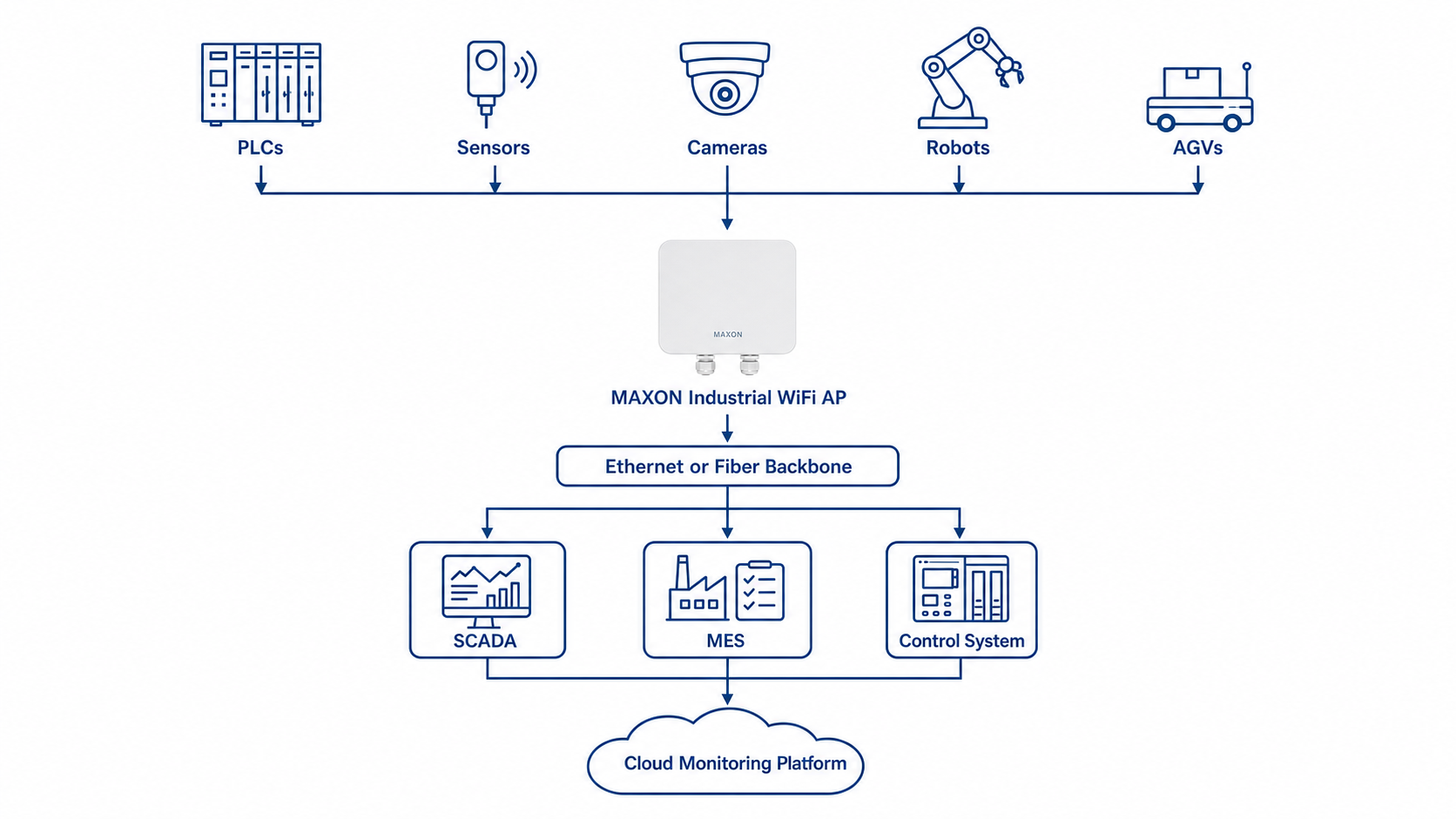
The module can sit in a field device, gateway or access point. Its position changes the requirement. A client inside a mobile robot needs a different software and roaming design from a 4x4 module inside an access point.
Industrial gateways and edge computers
A gateway usually collects data from controllers, sensors or serial devices and passes it to an Ethernet, WiFi or cloud network. Module selection starts with the host board.
Confirm:
- Mini PCIe or M.2 E-key;
- required 2.4 GHz, 5 GHz or 6 GHz band;
- AP, STA or documented dual-role requirement;
- host processor and operating system;
- available power and cooling;
- antenna placement inside the enclosure.
MX520VX or MX530VX can be candidates for an established Mini PCIe WiFi 5 platform. ME6922 FD and ME6924 FD are WiFi 6 DBDC Mini PCIe candidates. M.2 WiFi 6 or WiFi 7 modules require a compatible M.2 E-key design.
Industrial wireless access points
An AP module must support the intended bands, radio chains and software mode. Capacity planning also depends on traffic per client, channel width, interference and the CPU or network path of the finished AP.
For a 5 GHz 4x4 WiFi 6 AP design, MX6924 F5 or MX6974 F5 can enter the shortlist. For a 2.4/5 GHz DBDC design, ME6922 FD or ME6924 FD may be more relevant, but their radio and interface configuration differs.
Do not translate a PHY rate into an AP throughput or client-capacity promise. Test the finished device with the target client mix.
AGVs and AMRs
An AGV or AMR needs continuous communication while it moves between access-point coverage areas. The module is only one part of the roaming system.
Evaluate:
- AP placement and overlap
- Client roaming implementation
- Authentication delay
- Application retry behavior
- Latency and packet-loss limits
- Antenna orientation on the vehicle
- Interference along the route
WiFi 6 can improve efficiency when many mobile clients share the network, but it does not guarantee a handoff time. Confirm the client driver, AP controller behavior and application tolerance through a route test.
Avoid using a general "low latency" claim. Record the required latency, test method, packet size, load and roaming condition.
Industrial robots
Robots may use WiFi for diagnostics, program transfer, status reporting, video or supervisory commands. These workloads do not have the same risk.
Before replacing a cable, separate non-critical monitoring traffic from safety-related or hard real-time control. A wireless module should not be presented as suitable for a safety-critical control loop without a complete system assessment.
For a stationary robot, antenna placement and metal obstruction may dominate the RF design. For a mobile robot, roaming and changing orientation add further variables.
Machine vision and AI inspection
Machine-vision systems can generate sustained traffic from one or more cameras. Required throughput depends on:
- resolution and frame rate;
- number of streams;
- compression method;
- uplink duty cycle;
- retransmissions and interference;
- available channel width;
- distance and antenna system.
WiFi 6 or WiFi 7 can be evaluated when WiFi 5 cannot meet the measured workload. Run an application-level test with the production codec and frame rate. Peak PHY rate does not show whether the system can maintain the required stream.
Industrial IoT and data acquisition
Many IIoT devices send small packets at intervals. For these products, power, software maintenance and band availability may matter more than maximum data rate.
A WiFi 5 module can still be appropriate when the host and driver are established. WiFi 6 becomes more useful when many active devices compete for airtime or when the new product already uses a compatible WiFi 6 platform.
Collect the packet size, reporting interval, number of devices and expected simultaneous activity before selecting the radio.
Match applications to MAXON module families
| Requirement | Candidate family | Important limitation |
| Established Mini PCIe WiFi 5 design | MX520VX / MX530VX | Confirm host release and radio-chain requirement |
| 2.4/5 GHz DBDC WiFi 6 | ME6922 FD / ME6924 FD | Confirm connector map and exact software support |
| 5 GHz 4x4 WiFi 6 M.2 | MX6924 F5 / MX6974 F5 | No confirmed 2.4 GHz support |
| 5 GHz WiFi 7 | MX7000F5 | Confirm exact chipset and driver |
| 6 GHz WiFi 7 | MX7000F6 | Confirm regulatory domain and software |
| 2.4/5 GHz WiFi 7 | MX7000FD25 | Do not claim 6 GHz support |
Use the Industrial WiFi Module Selection Guide to turn these candidates into a qualified shortlist.
Use M.2 vs Mini PCIe for Industrial WiFi Modules before changing a carrier-board interface. For generation and chipset comparisons, see WiFi 5 vs WiFi 6 vs WiFi 7 and the Qualcomm Industrial WiFi Module Guide.
Industrial WiFi module application FAQ
Q: What should an AGV or AMR project test before choosing a WiFi module?
A:Test the complete route, including coverage overlap, handoff behavior, interference and changing vehicle orientation. Use the production host, driver, antennas and access points. A bench throughput test does not show how the link behaves while the vehicle moves.
Q: Which module factors matter for machine-vision cameras?
A:Start with the sustained video bitrate, frame-loss tolerance and number of active cameras. Check the required band, available channel width, host interface, antenna placement and enclosure temperature. Test several cameras at the same time because aggregate traffic changes airtime use.
Q:Does an IIoT sensor need the newest WiFi generation?
A: Not always. A sensor sending small packets may benefit more from a proven driver, low thermal load and long-term platform availability than from peak PHY rate. Record packet size, reporting interval and the number of simultaneously active devices before choosing.
Q: Can one module design cover both an industrial access point and a mobile robot?
A:The same module may appear on both shortlists, but the qualification work is different. An access point design focuses on AP mode, client load, Ethernet path and thermal behavior. A mobile robot also needs route testing, roaming checks and careful antenna placement.
Q:How should an industrial gateway module be selected?
A:Begin with the carrier board and software platform. Confirm the connector, voltage, host processor, operating system, required bands and AP or STA mode. Then test the gateway with its real field traffic and enclosure.
Information MAXON needs for a recommendation
Provide:
- equipment type and workload;
- host processor and operating system;
- Mini PCIe or M.2 interface;
- required bands and radio chains;
- AP or STA requirement;
- mobility and roaming requirement;
- antenna and enclosure constraints;
- target countries;
- prototype and annual quantities.
MAXON engineering can then confirm the documented fit and identify driver, RF, thermal or certification questions that need further review.
Contact: This email address is being protected from spambots. You need JavaScript enabled to view it.